DBC Files
A DBC file is a common method to describe the contents of a message transmitted over a CAN bus, but it can of course be used for other networks as well. It is a text-based keyword file introduced by Vector Informatik GmbH.
The different parts of the DBC file are described in the following sections.
Nodes in the Network (BU_)
A DBC file starts with the definition of the nodes in the network. The list of nodes is defined by a BU_ keyword followed by the names of the nodes separated by a space. The name of the node is used to refer to it in the rest of the file. Example:
BU_: Airbag_MQB BMS_MQB Datenlogger_MQB Gateway_MQB Getriebe
Messages (BO_)
After the list of nodes the messages are defined. Each message starts with a BO_ keyword followed by the message identifier, the name of the message, the length of the message in bytes, and the name of the transmitting node. Example:
BO_ 134 LWI_01: 8 Gateway_MQB
BO_: Indicates that this is a message. (Likely derived from the German word Botschaft, "message".)134: The message identifier (the arbitration ID in decimal notation).LWI_01: The name of the message.8: The length of the message in bytes.Gateway_MQB: The name of the transmitting node.
Signals (SG_)
Each message contains a number of signals. A signal is described by a SG_ keyword followed by the name of the signal, the start bit, the length in bits, the byte order (0 for big endian, 1 for little endian), signed (-) or unsigned (+), the factor, the offset, the minimum and maximum value, the unit, and the receiving nodes.
For little endian signals the start bit is the least significant bit, while for big endian signals the start bit is the most significant bit. Bits are counted in a sawtooth manner from right to left, where the right-most bit of byte n is bit number n × 8 starting with n = 0.
For example, byte 0 is numbered from bit 7 on the left to bit 0 on the right, and byte 1 is numbered from bit 15 on the left to bit 8 on the right.
For example:
SG_ LWI_Lenkradwinkel : 16|13@1+ (0.1,0) [0|800] "Deg" Airbag_MQB
SG_: Indicates that this is a signal.LWI_Lenkradwinkel: The name of the signal.16|13@1+: A signal that starts at bit 16, is 13 bits long, is little endian, and is unsigned.(0.1,0): The factor and offset to convert the raw value to the actual value. In this case the actual value is calculated by multiplying the raw value by 0.1 and adding 0.[0|800]: The minimum and maximum value of the signal after applying the factor and offset."Deg": The unit of the signal.Airbag_MQB: The name(s) of the receiving node(s).
Comments (CM_)
Comments can be added to the DBC file using the CM_ keyword. The comment can be added to a message, signal, or node. Example:
CM_ SG_ 134 LWI_Lenkradwinkel "Variable ratio effect included";
CM_: Indicates that this is a comment.SG_: The type of object the comment is for. In this case a signal.134: The message identifier in decimal.LWI_Lenkradwinkel: The name of the signal the comment applies to.
Values (VAL_)
Values, also called state-encoded signals or enums, are used when a signal value is used to indicate some state. For example:
VAL_ 159 EPS_HCA_Status 0 "disabled" 1 "initializing" 2 "fault" ;
VAL_: Indicates that this is a value.159: The message identifier in decimal.EPS_HCA_Status: The name of the signal the values apply to.0 "disabled": The raw value 0 decodes todisabled. Similar for the values that follow.
Example
Using software such as cabana, it's possible to visualize and decode messages from a DBC file:
BO_ 170 WHEEL_SPEEDS: 8 XXX
 SG_ WHEEL_SPEED_FR : 7|16@0+ (0.01,-67.67) [0|250] "km/h" XXX
 SG_ WHEEL_SPEED_FL : 23|16@0+ (0.01,-67.67) [0|250] "km/h" XXX
 SG_ WHEEL_SPEED_RR : 39|16@0+ (0.01,-67.67) [0|250] "km/h" XXX
 SG_ WHEEL_SPEED_RL : 55|16@0+ (0.01,-67.67) [0|250] "km/h" XXX
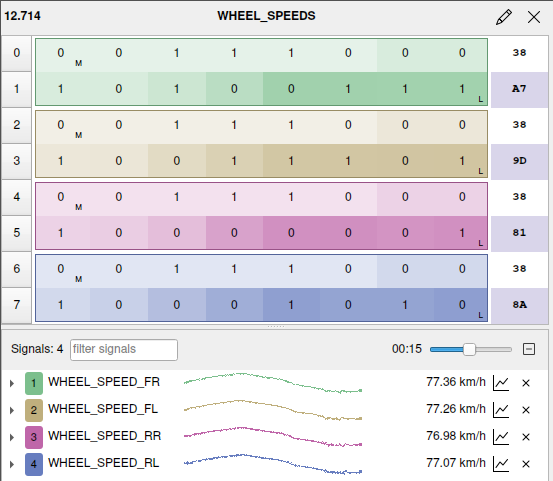 Visualization of the wheel speed message from a Toyota Rav4 in cabana. The byte number is displayed on the left. The byte value is shown as a binary in the middle, and in hexadecimal on the right. The signals are shown in the bottom half.