OEM Update Files
Before you can reverse engineer an ECU you need its firmware. Reading it out over CAN (using UDS, XCP, etc), or reading it off the chip directly is one route, but is typically blocked by read-out protection or is relatively invasive. The other route is to let the manufacturer hand you the firmware: every time a dealer reflashes a control unit, the new image is shipped to the workshop as a file. Those files are the subject of this chapter.
OEM update files are attractive because they are an official, complete copy of the exact code that runs on the ECU. They typically also contain the memory layout, the part numbers, and sometimes the security and signing scheme. The catch is that each manufacturer wraps that payload in its own container format, with its own compression and (increasingly) its own encryption. The rest of this chapter walks through why these files exist and how the major formats are put together.
Why OEMs Ship Updates
Software in a modern car is not finished when the vehicle leaves the factory. Manufacturers reflash ECUs in the field for many reasons:
- Bug fixes in control logic that surface only after vehicles are on the road.
- Recall and emissions compliance, where a defect is corrected by reprogramming rather than replacing hardware.
- Drivability and calibration improvements, such as shift quality, idle behavior, or fuel and spark maps.
- Security patches that close vulnerabilities in CAN, UDS, or telematics interfaces.
- Feature changes, sometimes tied to a subscription or a later option purchase.
Two document types make this visible to the public. A Technical Service Bulletin (TSB) is guidance the manufacturer sends to its dealer network describing a known condition and the prescribed fix. A recall is for safety-related defects and is overseen by a regulator (NHTSA in the United States), which requires the manufacturer to notify owners and remedy the problem for free [1]. More and more recalls are resolved by a software reflash instead of a parts swap, and NHTSA now flags recalls that are fixed over the air. Hyundai recall 20V-213 is a typical example [2].
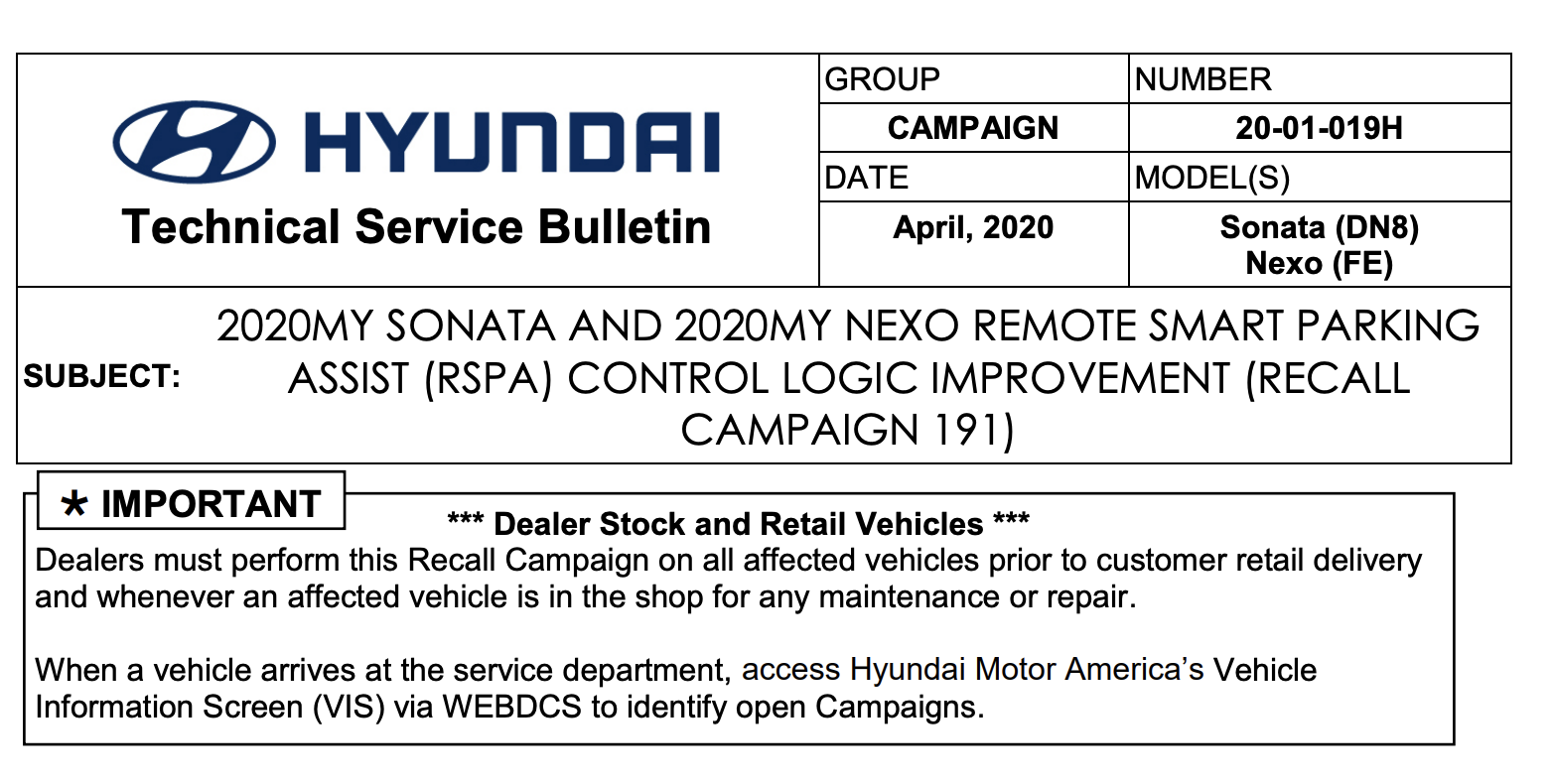 Hyundai Technical Service Bulletin / recall campaign 20-01-019H, describing an ECU software update rather than a parts replacement.
Updates and recalls are not the only reason these files exist. Manufacturers like Volkswagen and Ford reuse the same ECU hardware across many different models and model years, so a replacement part from the dealer is generic: before it will work in a given car it first has to be flashed with the matching firmware. As a result, flash files exist for almost every control unit as part of normal parts and service operations, whether or not a TSB or recall has ever been issued.
BMW (SWFL)
BMW delivers the software for an individual control unit as a SWFL ("software flash") container, found inside psdzdata, the large programming data pack used by ISTA and E-Sys. Each SWFL is a pair of files that share an identifier and a version suffix: an XML header (swfl_<id>.xml.<version>) and the flash data itself (swfl_<id>.bin.<version>), for example:
swfl_00005f9f.xml.142_011_020
swfl_00005f9f.bin.142_011_020
The XML is a BINARY-HEADER describing one BINARY-FLASHBLOCK. It records the identifier and version, the signature scheme (here RSA-2048 over SHA-256), a CRC16 checksum, and one or more flash segments that map a source range inside the .bin to a target address range in the ECU:
<BINARY-FLASHBLOCK>
  <SHORT-NAME>swfl_00005f9f</SHORT-NAME>
  <SDGS>
    <SDG>
      <SDG-CAPTION><SHORT-NAME>Ident</SHORT-NAME></SDG-CAPTION>
      <SD SI="ProcessClass">swfl</SD>
      <SD SI="Identifier">00005f9f</SD>
      <SD SI="Version">142_011_020</SD>
    </SDG>
    <SDG>
      <SDG-CAPTION><SHORT-NAME>SignatureTable</SHORT-NAME></SDG-CAPTION>
      <SD SI="SignatureStatus">SIGNED</SD>
      <SD SI="SignatureKeyLength">2048</SD>
      <SD SI="SignatureHashMode">SHA256</SD>
      <SD SI="SignatureMode">rsa</SD>
    </SDG>
    <SDG>
      <SDG-CAPTION><SHORT-NAME>Checksum</SHORT-NAME></SDG-CAPTION>
      <SD SI="Mode">CRC16</SD>
      <SD SI="Value">E04B</SD>
    </SDG>
  </SDGS>
  <FLASH-SEGMENTS>
    <FLASH-SEGMENT COMPRESSION-STATUS="UNCOMPRESSED">
      <SOURCE-START-ADDRESS>0000000</SOURCE-START-ADDRESS>
      <SOURCE-END-ADDRESS>057FFD0</SOURCE-END-ADDRESS>
      <TARGET-START-ADDRESS>1000020</TARGET-START-ADDRESS>
      <TARGET-END-ADDRESS>157FFF0</TARGET-END-ADDRESS>
    </FLASH-SEGMENT>
  </FLASH-SEGMENTS>
</BINARY-FLASHBLOCK>
The matching .bin holds the raw flash data for those segments. The COMPRESSION-STATUS attribute on each segment says whether that segment is compressed. When it is, BMW uses NRV, part of Markus Oberhumer's family of LZO-derived algorithms (the same author behind LZO and UPX) [9]. The open-source UCL library implements a compatible subset, and the practical tool is uclcli [10], which decompresses and recompresses the NRV data so the underlying image can be analyzed.
Ford (VBF)
Ford (along with Volvo and Mazda) uses the .vbf format. Files are obtained through Ford's FDRS dealer tool, or located and flashed with the third-party FORScan [7].
A VBF is the easiest to read: it starts with a plain ASCII header block, followed by the binary data blocks. The header records the software part number, the target ECU address, which memory ranges to erase, and the integrity and signing fields:
vbf_version = 3.1;

header {
    // This file was created by Hexview V1.12.02
    description = {"Ford Software", "Unsigned"};
    sw_part_number = "ML3V-14D003-BD";
    sw_part_type = EXE;
    data_format_identifier = 0x00;
    ecu_address = 0x730;
    frame_format = CAN_STANDARD;
    erase = { { 0x10040000, 0x180000 } };
    verification_structure_address = { 0x101BFD00 };
    public_key_hash = "5502BDA5815BC952...";
    file_checksum = 0x8DF103F0;
    sw_signature = {"28D6B7AAF86B72F0..."};
}
After the closing brace of the header come the data blocks. Each block is a fixed little structure: a 4-byte big-endian start address, a 4-byte big-endian length, the data itself, and a 2-byte CRC-16/CCITT over the (uncompressed) data. The header's file_checksum is a CRC-32 over the whole binary section.
The data_format_identifier selects how the block data is encoded. 0x00 is raw; 0x10 means the block is LZSS compressed (Lempel-Ziv-Storer-Szymanski, an LZ77 variant that drops back-references shorter than the break-even length) [8]. A convenient tool for viewing and editing all of this, including the LZSS layer, is qvbf [6].
Tesla (BHX)
Tesla does not sell flash files through a dealer portal the way the legacy OEMs do. Instead, full and incremental updates are delivered over the air: the car opens a VPN tunnel to Tesla's servers, fetches an encrypted firmware blob over plain HTTP, and is given the decryption key over the secure channel. Pen Test Partners' write-up is a good reference for how the whole update pipeline fits together [11]. Individual ECU images (.bhx files) can be recovered from a dumped infotainment (MCU) image.
The module images use a small chunked container. It opens with a GHDR ("global header") record and one or more SHDR ("segment header") records, each carrying an id, a start address, and a length as big-endian 32-bit values, followed by the raw firmware:
00000000: 4748 4452 0000 0001 000f 89a4 5348 4452  GHDR........SHDR
00000010: 0000 0001 00fe 0000 000f 89a4 c0de cafe  ................
00000020: 00a5 0001 00fe 1000 0000 0000 ffff ffff  ................
Here the SHDR record gives a start address of 0x00FE0000, and a four-byte 0xC0DECAFE word follows before the firmware itself begins. Carving out the data after the headers gives a flat binary that loads into a disassembler at the address from the SHDR.
Toyota (CUW)
Toyota, Lexus, and Scion calibration updates are .cuw files ("Calibration Update Wizard"), downloaded from the TIS portal and applied by the Calibration Update Wizard inside Techstream.
A CUW is simple to inspect: it is a plain-text, INI-style file that opens in any editor. A header describes the vehicle and the target ECUs, including the seed/key material used for the UDS security access during programming, and the firmware itself is embedded further down. Long key fields are truncated below:
[Format]
Version=103
[Vehicle]
DateOfIssue=2020-02-05
VehicleType=AXAH54L
EngineType=A25A-FXS
VehicleName=RAV4
ModelYear=19
[Node01]
DiagID=07A1
ECUAuthKey=3542354838...
ServiceAuthKey=45323A3739...
[CPU11]
CPUImageName=8965B0R02300.xx
NewCID=8965B0R02300
CompressionAlgorithm=40
SeedKey=3538483935...
Nonce=30323445493...
[CPUImage11]
NumberOfAreaSettings=2
01_StartAddress=10008000
01_Length=00008000
02_StartAddress=10028000
02_Length=001D8000
The payload under each [CPUImageNN] section is Motorola S-record (SREC) data. Some CUW files compress the S-record payload with LZF (Marc Lehmann's liblzf, a tiny and very fast LZ77 variant) [5], which has to be inflated first; the CompressionAlgorithm field in the header indicates this. On newer ECUs the image is encrypted, so a raw SREC-to-binary conversion only yields ciphertext.
Volkswagen Group (FRF / ODX)
VW, Audi, Škoda, SEAT, and the rest of the VAG brands distribute flash data ("flashdaten") as .frf files, downloaded through ODIS or the erWin portal.
An FRF is a thin obfuscation wrapper around a ZIP archive. The whole file is run through a custom byte-wise stream cipher, and the decrypted result is an ordinary ZIP containing an ODX-F flash container (or an SGO binary). The easiest way to unpack one is Brian Ledbetter's VW_Flash toolkit [4]. Its frf/decryptfrf.py reverses the stream cipher and extracts the ZIP, and extractodx.py goes one level deeper to produce a flashable binary from the ODX flash blocks:
Inside the ZIP is the ODX flash file. ODX (Open Diagnostic data eXchange) is an ASAM and ISO standard, XML-based, that describes ECU diagnostic and flash data [3]. The flash flavor (often called ODX-F) is human readable and self-documenting. The top of the container identifies the part and the tool that built it:
<ODX MODEL-VERSION="2.0.1" ...>
  <FLASH ID="FL_3Q0907530AA5366_S">
    <SHORT-NAME>FL_3Q0907530AA5366_S</SHORT-NAME>
    <LONG-NAME>3Q0 907 530AA 5366 _S</LONG-NAME>
    <ADMIN-DATA>
      <DOC-REVISIONS>
        <DOC-REVISION>
          <REVISION-LABEL>5366</REVISION-LABEL>
          <STATE>NEW</STATE>
          <DATE>2018-06-29T09:44:42</DATE>
          <TOOL>EB tresos Flashbuilder V2.1.6</TOOL>
        </DOC-REVISION>
      ...
Further down, a SESSION lists the spare-part numbers the image is valid for (EXPECTED-IDENT), and the actual memory image is described by DATABLOCK / SEGMENT / FLASHDATA elements. Each segment carries its start address and size, and each flash data block records how it is encoded and (if needed) compressed:
<DATABLOCK ID="...DB_0DATA" TYPE="DATA">
  <SEGMENTS>
    <SEGMENT ID="...SEG_0DATA">
      <SOURCE-START-ADDRESS>...</SOURCE-START-ADDRESS>
      <UNCOMPRESSED-SIZE>...</UNCOMPRESSED-SIZE>
    </SEGMENT>
  </SEGMENTS>
</DATABLOCK>
<FLASHDATA ID="...FD_0DATA" xsi:type="INTERN-FLASHDATA">
  <DATAFORMAT SELECTION="BINARY"/>
  <ENCRYPT-COMPRESS-METHOD TYPE="A_BYTEFIELD">00</ENCRYPT-COMPRESS-METHOD>
  <DATA>...</DATA>
</FLASHDATA>
The ENCRYPT-COMPRESS-METHOD byte is what tells the tool whether the embedded <DATA> is plain, compressed, or encrypted, which is exactly the part extractodx.py knows how to undo.